
When Should You Convert a File - and When Should You Never Convert It?
Conversion is not a default. It is a decision about what the next system, person, or workflow needs from the file. Good conversion improves compatibility; bad conversion hides information you may need later.
By Cloudy Convert
Practical guides from the Cloudy Convert team on files, formats, privacy, and digital workflows.
Conversion is a decision, not a habit
Every conversion trades something. You may gain compatibility, a smaller payload, or a cleaner handoff. You may also lose layers, metadata, color accuracy, editability, or confidence that the output matches the source.
That trade can be worthwhile. The mistake is converting before identifying the destination. A file should change because the next system or person needs something different, not because a dropdown offered a newer extension.
Convert when it solves a defined problem
Compatibility requires it
The receiving app, browser, device, or client cannot open the source format.
Delivery needs a smaller file
The destination has upload limits or your audience would benefit from less data.
A derivative has a different job
A website image, social preview, thumbnail, or print export needs its own dimensions.
The workflow needs a handoff
Another person or system expects a specific format at a defined stage.
These are delivery decisions. You are making a version for a known destination while keeping the original available for the next decision.
Do not convert when the change creates risk
You need an editable master
Flattening or exporting can remove layers, paths, formulas, or future editing options.
Exact fidelity is required
Lossy compression, color changes, or font substitution can alter the evidence in the file.
The document is signed
A change to a signed or certified file may invalidate the signature or its verification trail.
Important metadata must survive
Conversion can discard authorship, location, color profiles, timestamps, or embedded context.
The original is not a backup after the fact
Once a conversion discards information, renaming the output or converting it back cannot reliably restore what was lost. Protect the source before experimenting.
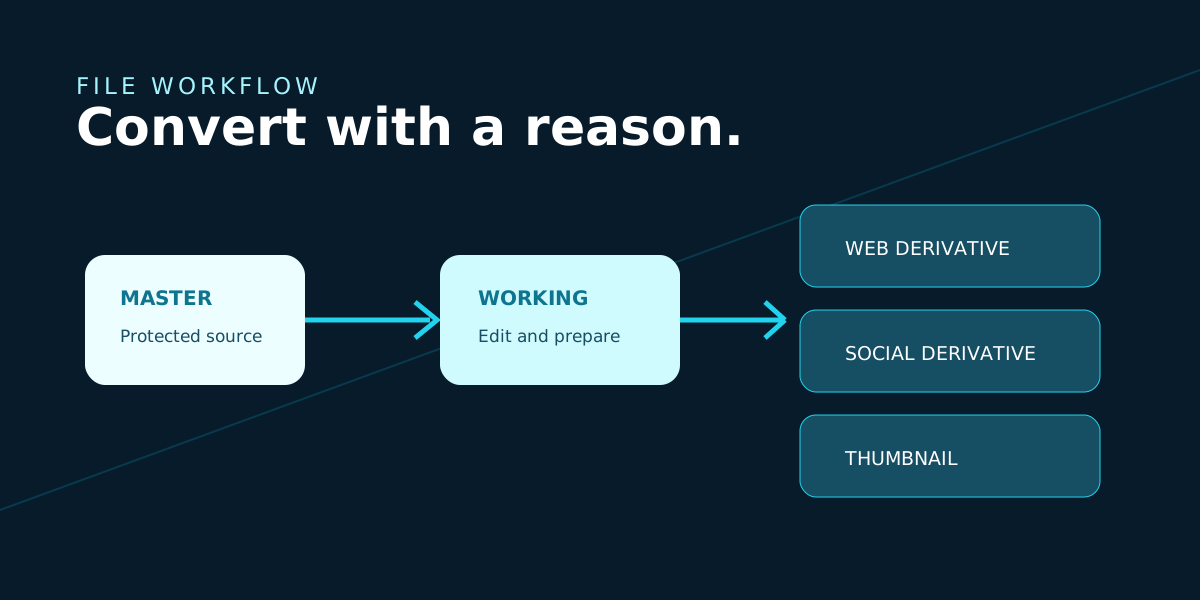
Master -> Working -> Delivery
A durable workflow separates the file you preserve from the files you change and send. That one boundary makes format decisions reversible and gives every export a clear purpose.
The master can be a RAW photo, layered design, editable document, or original SVG. The working asset is where production happens. Delivery files are disposable by design: they can be regenerated when requirements change.
Ask these questions before exporting
What is the destination? Name the app, platform, device, print process, or person receiving the file.
What must survive? Check layers, transparency, metadata, color, text, signatures, and editability.
Can this be regenerated? If yes, treat the output as a delivery derivative and document its settings.
Did you compare the output? Open it in the destination context instead of trusting the extension or export dialog.
Use a converter when the next step is clear
Once you know the required output, conversion becomes a practical production step rather than an act of faith. Make a copy, choose the destination format, and inspect the result for the information your workflow depends on.
A useful place to start
Need to create a delivery derivative from a source you are keeping intact? CloudyConvert can process common image and document formats locally in your browser, so you can prepare the copy after deciding what the destination needs.